RIWA Base Requirements
Overview
Manual for the Real-Time Integrated Weld Analyzer (RIWA) system.
Standard RIWA Requirements
The following system and software requirements are necessary before moving forward with setting up your RIWA System.
PLC Signals Requirements
- RIWA requires a WeldID a.k.a
local_weld_type_idsignals an identifier denoting a weld schedule from the PLC. - RIWA currently supports the following PLC protocols:
- DeviceNet.
- Profinet.
- Ethernet / IP.
Additional PLC Features
- RIWA supports additional special functions, depending on which PLC signals are available.
- See RIWA documentation for full details.
Part Tracking Requirements
- To track individual part instances, a Part Counter Number is required for the RIWA system.
- This counter uniquely identifies the specific part instance for any given weld.
- The Part Instance Counter must be sent alongside the WeldID so the RIWA system can properly associate each Weld with its Parent Part.
Read more under the Description of Essential Commands article found here.
Timing Diagram
hinweis
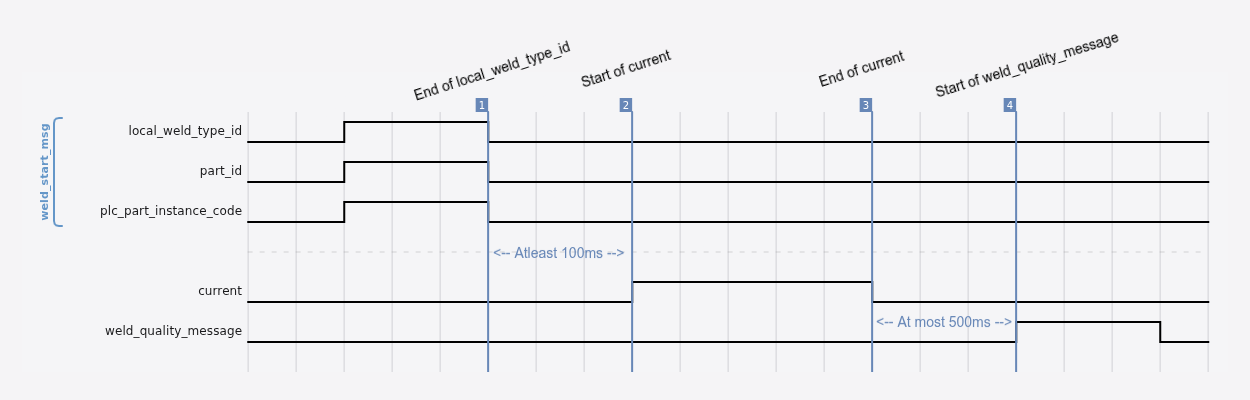
The timing diagram above illustrates the sequence of events between the PLC and RIWA Hub.
Please note that a heartbeat event is sent for 1000ms every other second. This event is asynchronous to the other events.
RIWA Browser Requirements
- RIWA includes a user-facing frontend web-application called the RIWA Browser that is served by the RIWA Hub.
- To access the RIWA browser, the RIWA Hub needs to be accessable via the internal network managed by the facility.
- It is recommended that Google Chrome or the Chromium web browser is used exclusively to access the RIWA Browser.
Time Synchronization Requirements
- Access to a timeserver is recommended for the RIWA Hub to allow for smoother operations.
RIWA Hub & Cluster Requirements
- The RIWA Hub allows the for Multiple RIWA Clusters to communicate with a single hub.
- This requires all the RIWA Hub's and RIWA Clusters to be on LAN with DNS entries for each machine or static IP's to ensure connection is not lost by DHCP lease expiration.