RSWA 4.8.0
· 7 Minuten Lesezeit
Various optimizations and feature updates to TDS, Desktop Tools and Array Explorer.
TDS Download
Breaking
- For security reasons, the logo must now be located inside
C:\ProgramData\tessonics\tds2\data\img\and thelogo_nameparameter in the settings must be relative to this directory.- Allowed file extensions:
.png,.jpe,.jpeg,.jpg,.gif,.bmp,.ico,.tiff,.tif,.svg,.svgz.
- Allowed file extensions:
- For security reasons, TDS will redirect all API requests to it's proper URL before responding. On redirection, HTTP queries might not forward authentication headers which will result in
Unauthorizedresponses. Make sure to target the URL TDS is listening on when using API calls.
Features
- New Snapshots feature:
- Settings page is now called "Admin Panel" and provides access to the known settings and the new snapshots feature
- TDS allows for the creation of template data snapshots which it can be reverted to at any time.
- These can be used as a backup strategy to create historical restoration points for error scenarios.
- Available in the Admin Panel (previously Settings Page).
- Snapshot directory can be set in the
tds-server.json- it is advisable to set this to a shared network drive.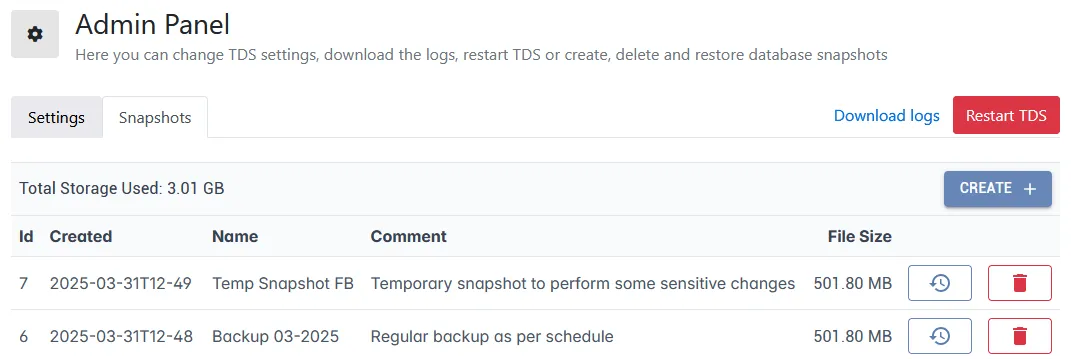
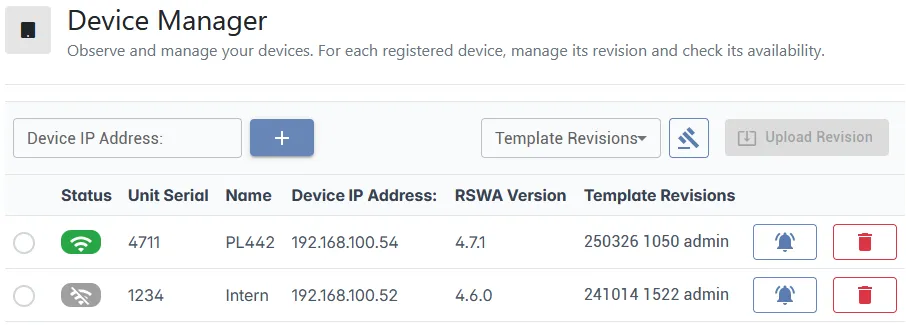
- Overhaul of the Device Manager page:
- Instant overview over all devices.
- Upload to revisions while still managing other devices.
- Display template revisions of all online devices.
- Reset of account passwords via CLI:
- Password Reset: server administrators can use the TDS command-line interface to reset passwords for all accounts, including the default
adminaccount. - To reset the password call
tds-server.exe change-passwordfrom the TDS installation directory.
- Password Reset: server administrators can use the TDS command-line interface to reset passwords for all accounts, including the default
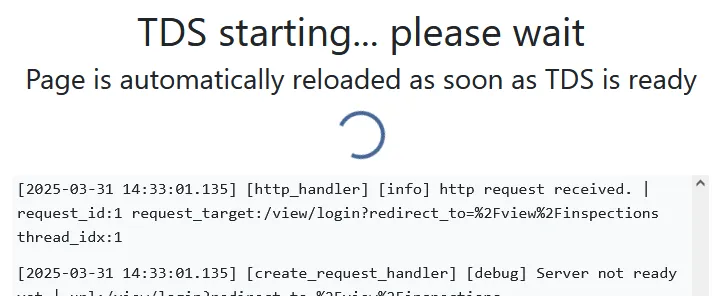
- On startup, TDS will display the logs for diagnosis.
- Filter inspections by device serial.

- Overhaul of the TDS installer:
- Allows setting the installation directory.
- Asks for TDS name/hostname/port during installation.
- Optionally enables the TDS system service.
- Doesn't block installation if another application is running on the desired port.
- Updates the TDS configuration file to contain all latest feature flags.
- Notice: For updating, we recommend users to install TDS v4.8 into the same directory as the existing TDS or uninstall the previous version before.
- Increased the amount of allowed characters for part/group/joint/reason names.
- Notice: We discourage using names longer than 50 characters as this could cause potential display issues on some screens.
- Small UI updates all around.
- CSV exports now have localized headers if available in your language.
- Can now hide deactivated users from the user filter list on the Inspections page.
Bugfixes
- Fixed bug on Product Overview page that would show incorrect inspection/measurement numbers.
- Mostly when importing inspections from the V3 software.
- On the Product Overview page, fixed missing lables on images and "Show Images" button not toggling the image display.
- Fixed
TodayandYesterdayfilters for report pages.- These now show entries from
00:00:00-23:59:59today or yesterday respectively instead of (now-24h) up to now.
- These now show entries from
- Fixed Reasons Overview page time filter buttons having the wrong captions.
- Fixed incorrect timestamp bug on inspection measurements.
- Fixed spot weld sorting on part report page - now sorts alphabetically.
- Fixed "Select All" checkbox on inspection page not enabling the "Print"/"Export"/"Delete" buttons.
- Fixed error messages when using invalid filter values.
- Fixed an error with user creation that made username duplication possible.
- Reordering of columns for CSV exports fixed.
- Fixed display errors for parts with certain special characters or double quotes (") in names.
- On inspection reports, parts with image errors now show an error message instead of loading images forever.
- Inspection images get now reopend if selecting the bullseye icon on a given joint.
- Display "Access Denied" message instead of being redirected to the login screen when logged into a user without proper permissions.
supervisorusers can now access the user-reports page ifhide_operator_namesis active.- Fixed
/welds/viewManyendpoint is now accessible without authentication as in previous versions. - Hotspots on the images on the parts page now show the hotspot name.
- Fixed a bug that would not change the logger level on soft restart.
- Fixed bug where "Sorting/Filtering" wasn't properly displayed when printing multiple inspections at once.
Array Explorer Download
Features
- During inspection, increased contrast of active spot flag on images.

- Selecting the Thumbnail button will switch back to last active image.
- Toggleable setting to remain on the same side while inspecting welds.
- Update to display of dead elements inside Probe Configuration:
- Fixed bug where some weaker elements were highlighted, even though they were still working properly.
- Must select Auto Setup to view red elements.
- Display warning popup with instructions if problematic elements are found.
- Changed color to dark red.
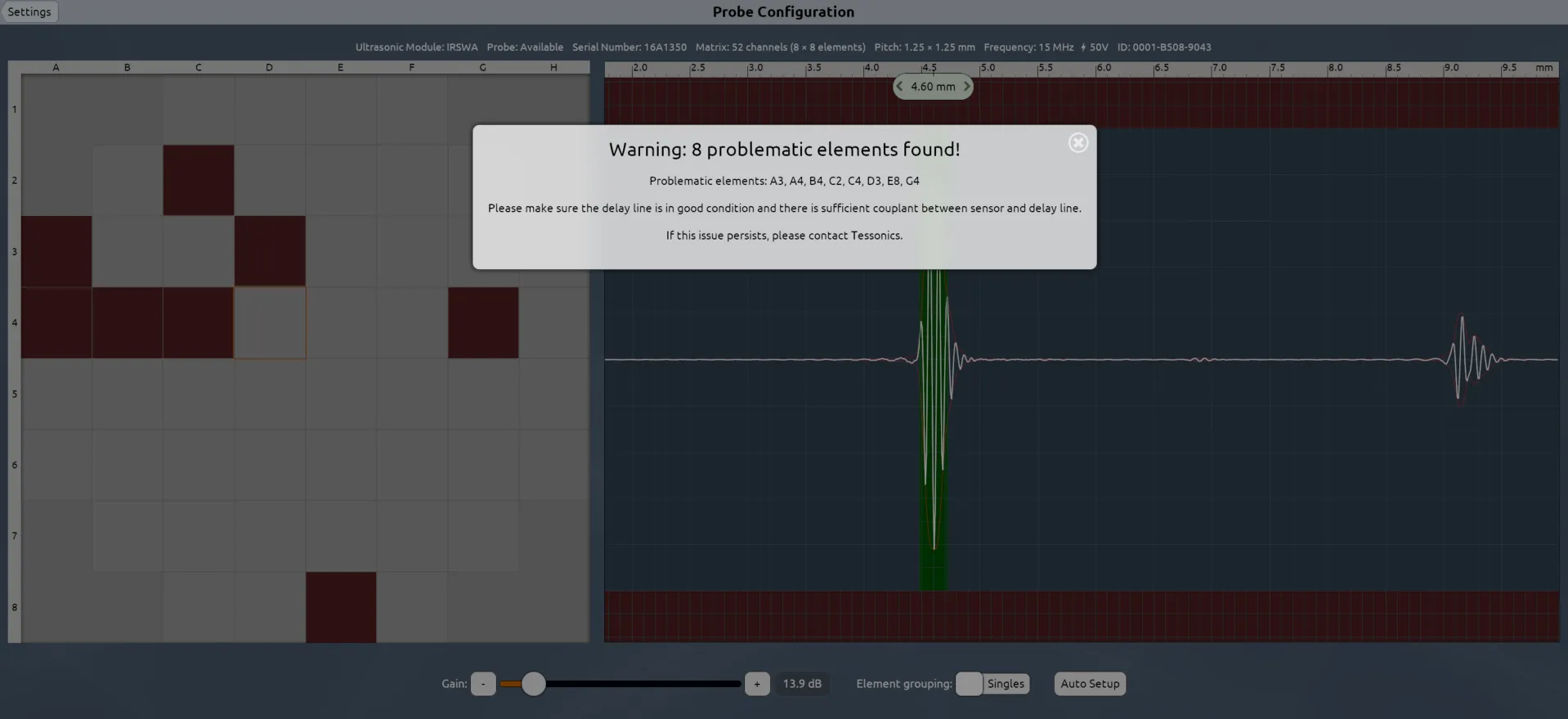
- Changed the close color on dialogs to be more visible.
- Check for low storage more often.
Bugfixes
- Fixed mid thickness button showing an ellipsis on middle plate thicknesses with two significant digits after the decimal.
- During inspection, when switching to the next spot, continuous mode is now stopped if it was active before.
- Fixed bug where images would sometimes be displayed in the wrong aspect ratio.
- Fixed an access violation that occurred when the setting "Only allow creator to contininue inspection" was enabled and an user who was not logged in tried to continue an inspection.
- Fixed bug where admin users wouldn't be able to resume inspections if they have been created by a different user and
Only allow creator to continue inspectionwas set. - Fixed bug where the list of filtered robots was not deleted when a new inspection was started in restricted mode.
- Fixed error from clicking on “Most recent saved inspection” without being logged in.
- Fixed bug where changing the
client_hide_login_user_listhad no effect until restarting the software. - Fixed permission bug where Array Explorer didn't exit the export page on user change.
- With "Default to continuous measurement" active, the remote buttons can now still be properly configured to just acquire single shot measurements.
- Remove bloat log messages from
TConnectivityUpdateThreadin the device logs. - Fix storage widget occasionally not being displayed properly.
Desktop Tools Download
Features
- Quick Collection now available:
- Inline with the v3 Designer features, joints can now be marked for the Quick Collection.
- They will appear in the separate Quick Welds/Bonds panel and can be manipulated there.
- The selection is client specific and temporary - Desktop Tools will forget the selection on restart, just like with Designer in the V3 software suite.

- Images can be imported from the clipboard (Ctrl+V).
- Additional keyboard shortcuts.
Bugfixes
- Logs out after deactivating currently logged-in user.
- User display is now refreshed on password change to reflect the new protection status.
- Fixed access violation when hitting refresh on an open image panel.
- Fixed occassional access violation bugs when importing joints from clipboard.
- Fixed occassional bug with assisted nugget calculation.
- Part list didn't get updated if a part inside a group got deleted.
- Fixed an error that the Version of TDS wasn't shown.
- Fixed an error that features weren't available that required a specific TDS version.
- Weld / Bond selection wasn't kept when switching to the images page.
- Fixed a bug where users without passwords couldn't perform privileged actions regardless of user group.
- Fixed a bug where deleting a part would not be shown until after refreshing.
V3 -> V4 Importer Download
Bugfixes
- Fixed reason UIDs not being imported into TDS properly.
- Display application version in the GUI.