Network Config
The device can be shipped with a custom IPv4 network setup. If it needs to be changed, there are two ways to configure the system’s network interfaces:
- Network Factory Reset; and
- Network Configuration Web Interface.
Network Factory Reset
If connection to the device cannot be established due to a malformed network configuration, the SRS network interface can be reset to a factory default. That is:
| Setting | Value |
|---|---|
| IP | 192.168.1.1 |
| Subnet | 255.255.255.0 |
| Gateway | 192.168.1.1 |
The factory reset can be performed by pulling GPIO_0 and GPIO_1 to 24 V on the M8 24 V power connector (see Power Supply).
The default network configuration will be applied, and the network adapter is reset.
Network Configuration Web Interface
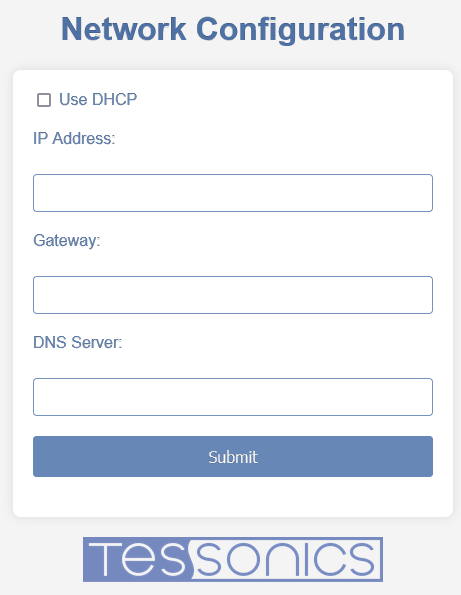
Alternatively, you can set a specific network configuration through the device’s network configuration web interface while it is in CONFIG mode.
CONFIG mode can be enabled by pulling GPIO_0 to 24 V on the M8 24 V power connector (see Power Supply). CONFIG mode stays enabled as long as GPIO_0 is continuously pulled to 24 V.
During that time, access the network configuration web interface by entering the SRS IP address in a browser. For example, if the SRS IP address is 192.168.1.15, open http://192.168.1.15.
The configuration interface allows you to enable or disable DHCP support or to configure a static network configuration manually.
Enter the IP address and subnet mask in CIDR notation. For example, 192.168.1.15 with subnet mask 255.255.255.0 is written as 192.168.1.15/24.
For more information about CIDR notation, see Classless Inter-Domain Routing on Wikipedia.
Submit validates the configuration syntax and applies the configuration to the SRS network interface. The network adapter restarts, and the SRS is available at the new IP address.