Desktop Tools Crashes when Creating Revision
Read the following document to help diagnose why Desktop Tools might crash when attempting to create a revision.
When Desktop Tools crashes and reports an error similar to the screenshot below, this indicates an error with Tessonics Data Service (TDS).
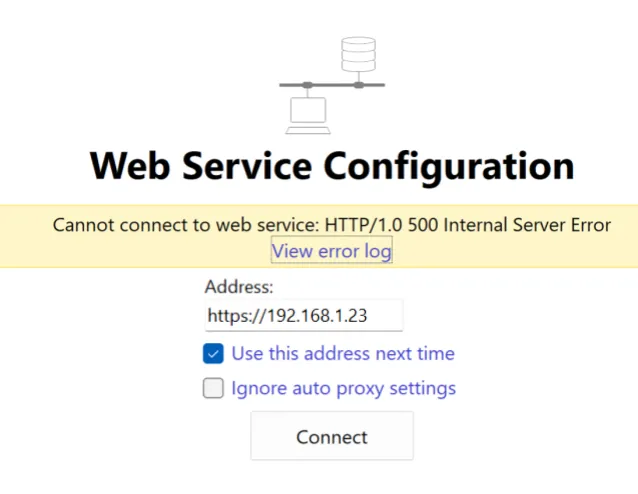
This error may occur when creating a revision due to one of three possibilities.
1. Not Enough RAM
If the computer running TDS does not have enough RAM to create a revision, TDS will throw an error resulting in Desktop Tools crashing. As your database continues to grow with more parts, images and other template data, the memory requirements increase.
Tessonics recommends at least 8GB of RAM. While 4GB is the minimum requirement to operate the software, this can become insufficient as the size of the database continues growing.
2. Out of Storage
Larger revisions may require more than 2GB of storage. If your server has hundreds of revisions, it is possible that the computer running TDS ran out of storage to create a new revision.
There are two ways to resolve this:
- Delete old revisions using Desktop Tools to free up more storage.
- Modify the TDS configuration to save revisions to an external drive (also described below in step 3).
3. TDS Uses a Network Drive for Storage
If TDS is using a network drive to store data, including revisions, this may cause unintended crashes and errors due to the following:
- Permission issues may arise, where the computer running TDS loses read or write access to the network drive.
- If the connection to the network drive is interrupted while TDS is operating (in this case, when creating a revision), it may cause TDS to crash or throw an error.
- Depending on the filesystem of the network drive or other IT-imposed restrictions, there could be file size limits which may be exceeded by a large revision.
For these reasons, Tessonics discourages the use of network drives with the RSWA software suites. Here are the steps to resolve this issue:
- Use a physical drive, such as an external hard drive to store large amounts of data. 1TB of storage is recommended for longevity.
- Copy all data from the network drive onto the physical drive.
- Modify the TDS storage configuration to point to the physical drive. Specifically, update the following:
common-file: refers to the main database file.revisions-dir: the folder containing all template revisions.snapshot-dir: the folder containing all snapshots.db-file: refers to the measurements database file.backup-dir: the folder containing all measurement backups.
- Restart TDS.
If all these steps have been resolved and Desktop Tools continues to throw errors when creating revisions, contact Tessonics customer support for further assistance.