A-Scan Panel
The A-Scan Panel displays the waveforms (or A-Scans) for the individual elements in the transducer's matrix. Each element can be manually selected on the C-Scan Panel.

If no element is selected, the panel displays an amalgamation of all readings at once.
Generally, it is recommended to select positions of interest rather than working with the aggregated results.

For ABIS (adhesive bond) inspections, the A-Scan Panel is displayed with a bright background.

A ruler is created as well, and the A-Scans are automatically aligned to the ruler. The default units are millimeters, though that can be changed via the Display Settings to micro seconds.
Markup
For RSWA (spot weld) inspections, the blue box represents the measured front plate thickness, while the brown lower box represents the measured total stack thickness. These boxes can be disabled via the A-Scan Markup setting in the Display Settings.
Similarly, for ABIS inspections, the bright blue box represents the measured front plate thickness and can be disabled similarly via the Display Settings.
Normalized vs Enhanced vs Raw A-Scans
By default, Array Explorer automatically displays the normalized, high frequency A-Scans, which are the processed copies of the A-Scans. This can be changed via the A-Scan View Mode setting in the Display Settings.
The A-Scan Markup cannot be displayed when viewing the raw A-Scans since the raw copy may not be aligned with the ruler.
- Normalized
- Enhanced
- Raw


2T Button
The 2T button allows you to optionally add a middle plate thickness. This should automatically be declared to the middle plate thickness specified in the template data, but if one has not been provided, then this button allows you to change it.
If you wish to measure 4T, please select the combined thickness of both middle plates.
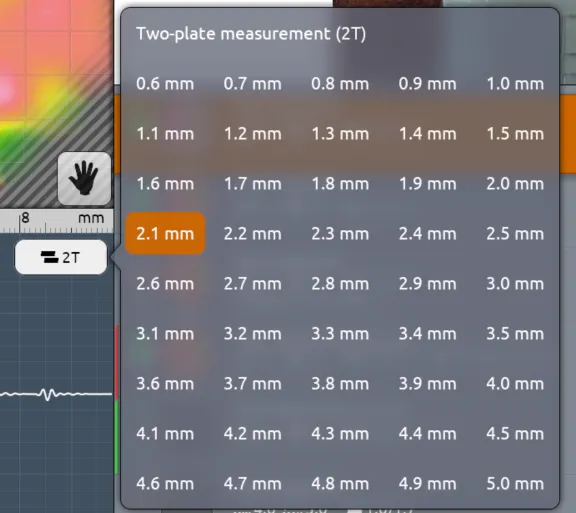
Selecting Two-plate measurement (2T) will remove the middle plate. Otherwise, the middle plate will be taken into account.
If a middle plate thickness has been specified, the a-scan markup will be updated to show the middle plate thickness next to the front plate thickness in pale blue.

If the measured front plate thickness and the programmed middle plate thickness exceed the measured stack thickness, the brown box will disappear. It is not plausible to have the front and middle plate thickness exceed the total stack thickness.
