Creating New Database
A new database can be created on a local disk. Create an empty folder and make sure you have read and write access permissions to it. Then choose File → Database → Create New from main menu.
While it is possible to store the V3 data on a network folder or on a mapped network drive, this is generally discouraged. Network drives may experience decreased performance depending on the quality of the network connection, and any network interruption can cause the V3 software to break.
Should you need to use the software suite across multiple devices, upgrade to our V4 software suite. Contact Tessonics for more details.
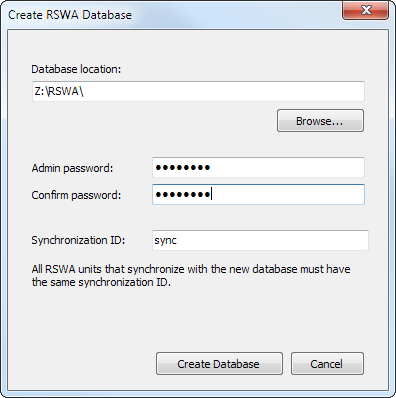
In the Create RSWA Database window, click the Browse... button next to the Database location field and choose the location where the new database will be created. Type in a password for an admin account twice to confirm, then type in a synchronization ID. All RSWA units that synchronize with the new database must have the same synchronization ID.
Click the Create Database button to complete this step.